





































Whether you’re a real estate agent, landlord, investor, or property manager, it’s essential to have the right tools to manage your business finances. The best real estate accounting software can track income and expenses, manage rent payments, automate billing, organize reports, and give you a clearer picture of your business’s financial health.
To help you choose the right accounting software for real estate, I researched accounting and property management platforms and narrowed the list to five top options for real estate sales agents, investors, landlords, and property managers.
| Software | Best for | Starting monthly price |
|---|---|---|
| DoorLoop | Growing real estate investors | $69* |
| Buildium | Property managers and landlords | $62 |
| FreshBooks | Mobile accounting app | $23 |
| QuickBooks Online | Third-party integrations | $38 |
| Stessa | Rental property investors | Free or $12* |
| *Billed annually | ||
Why you can trust The Close
As a real estate agent, I’ve seen firsthand how quickly finances can become overwhelming without the right systems in place. From managing commission income to tracking expenses across multiple deals, I understand what real estate professionals actually need from their accounting tools.
For this guide, I combined that firsthand experience with in-depth research to evaluate how each platform performs in real-world scenarios. At The Close, our editorial approach is built on delivering clear, practical, and unbiased guidance, so you can confidently choose the tools that best support your business.
Sophia Doyle
Staff Writer–The Close
- Best real estate accounting software compared
- DoorLoop: Best for growing real estate investors
- Buildium: Best for property managers and landlords
- FreshBooks: Best for mobile accounting app
- QuickBooks Online: Best for third-party integrations
- Stessa: Best for rental property investors
- How to choose the best real estate accounting software for you
- My methodology
- Frequently asked questions (FAQs)
- Bottom line
Best real estate accounting software compared
| Software | Standout features | The Close score |
|---|---|---|
| DoorLoop |
| 4.3 |
| Buildium |
| 4.0 |
| FreshBooks |
| 4.0 |
| QuickBooks Online |
| 3.9 |
| Stessa |
| 3.6 |
DoorLoop: Best for growing real estate investors
 | The Close score: 4.3 |
|---|---|
Pros
| Cons
|
Pricing
| |
Why I like DoorLoop
DoorLoop earns the top spot due to its strong accounting tools, making it a great fit for growing landlords and real estate investors who want to manage both finances and day-to-day rental operations in one place. It includes online rent and fee payments, tenant portals, maintenance management, accounting and reporting, and live bank connect.
What makes DoorLoop stand out is how approachable it feels compared with some larger property management systems. Investors and landlords can track income and expenses by property or unit, collect rent online, manage tenant requests, and run property management reports without needing a separate system for every workflow. DoorLoop is best for landlords and investors who want property management tools and accounting features together, especially if they plan to grow their portfolio.
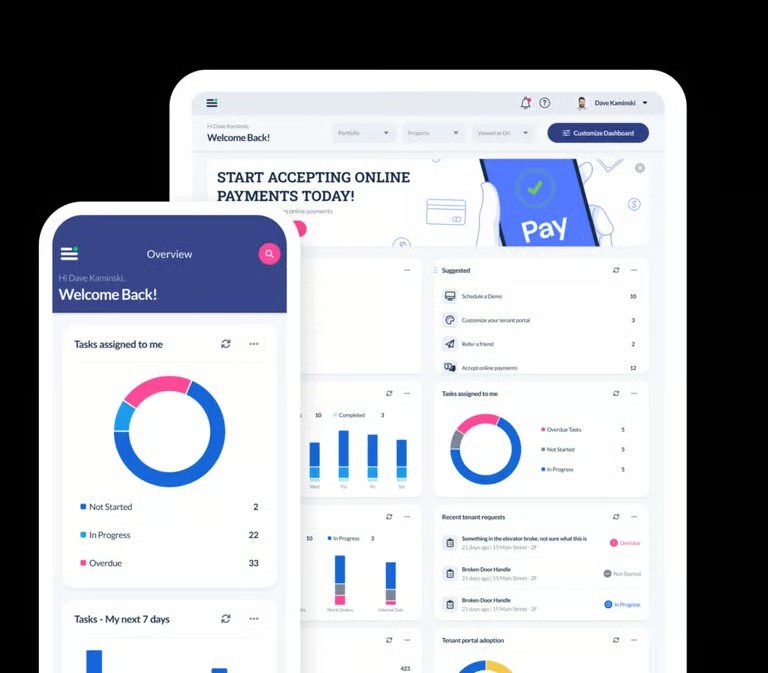
DoorLoop’s key features
- Mobile app
- Online rent and fee payments
- Tenant portal
- Owner portal
- Maintenance management
- Property-level accounting and reporting
- Bank account syncing and reconciliation
- Vendor management
- Custom reports
Buildium: Best for property managers and landlords
 | The Close score: 4.0 |
|---|---|
Pros
| Cons
|
Pricing
| |
Why I like Buildium
Buildium is one of the most established property management accounting platforms for landlords and property managers. It includes core accounting, maintenance, leasing, resident experience tools, online payments, bank reconciliation, financial reporting, and owner portals.
Buildium is a strong first for property managers who need more than basic bookkeeping. It can help manage rent payments, vendor bills, owner statements, maintenance, leasing, and reporting across a portfolio. While it may be more software than a solo real estate agent needs, it is a practical choice for landlords and property managers who want accounting and operations in one system.
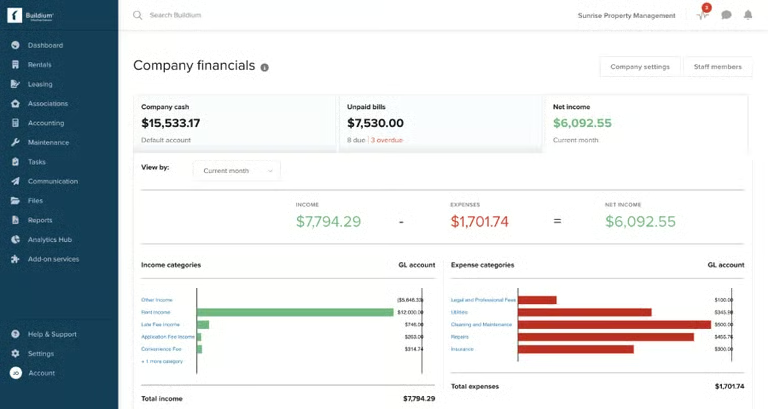
Buildium’s key features
- Mobile app
- Property-specific accounting
- Online payments and autopay
- Bank reconciliation
- Maintenance and work order management
- Financial reporting and standard reports
- Leasing tools
- Built-in 1099 e-filing
- Leasing tools
FreshBooks: Best for mobile accounting app
 | The Close score: 4.0 |
|---|---|
Pros
| Cons
|
Pricing
| |
Why I like FreshBooks
FreshBooks is a user-friendly cloud accounting platform that works especially well for real estate agents and small business owners who want to manage finances on the go. It includes invoicing, expense tracking, online payments, bank reconciliation, mobile apps, and mileage tracking, making it useful for agents who need to track business expenses, client-related costs, and travel throughout the week.
This provider is not a property management platform, so it does not include tenant portals, maintenance management, or common area expense allocation. However, it is one of the easiest tools for agents or solo real estate professionals who want clean accounting, simple invoicing, mobile receipt capture, and a dashboard that is easy to understand.
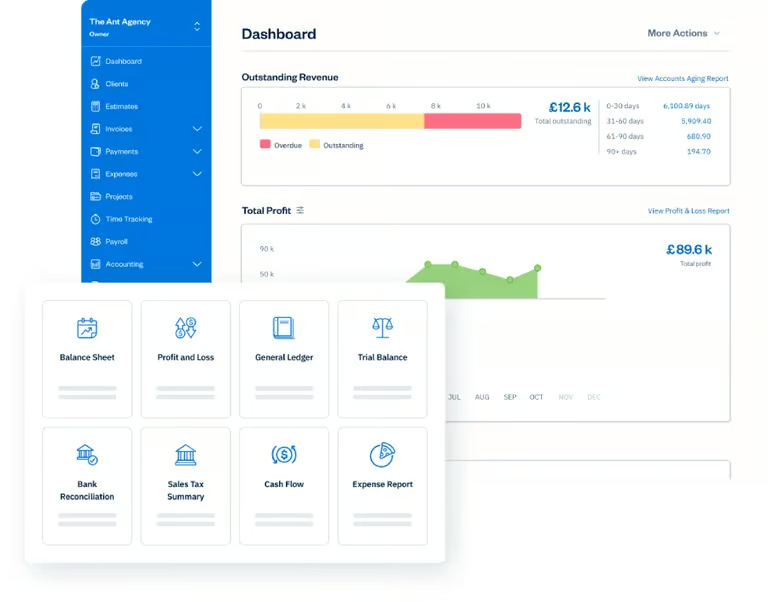
FreshBooks’ key features
- Mobile app
- Mileage tracking
- Invoicing
- Online payments
- Expense tracking
- Client portal
- Project tracking
- Profit and loss reporting
- Bank reconciliation
QuickBooks Online: Best for third-party integrations
 | The Close score: 3.9 |
|---|---|
Pros
| Cons
|
Pricing
| |
Why I like QuickBooks Online
QuickBooks is one of the most recognizable names in small business accounting, and it remains a strong option for real estate professionals because of its flexibility, integrations, and accountant support. It can handle income and expense tracking, invoicing, bill management, mileage tracking, receipt capture, reporting, bank fees, and accountant access.
For real estate agents, QuickBooks can help track commissions, marketing expenses, mileage, business meals, office costs, and tax-related records. For investors and landlords, it can be set up to track income and expenses by property using classes, locations, or projects, though it does not include native property management tools like tenant portals or maintenance requests. QuickBooks is best for real estate professionals who want a strong general accounting system that can connect with many other tools.
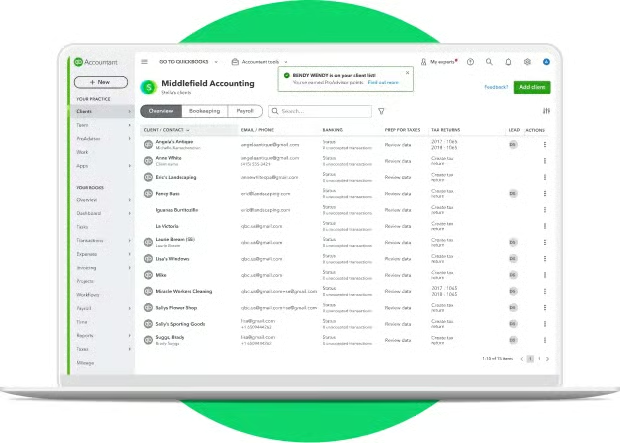
QuickBooks Online’s key features
- Mobile app
- Income and expense tracking
- Mileage tracking
- Receipt capture
- Invoicing and online payments
- Recurring invoices
- Bill tracking
- Bank feeds and reconciliation
- Profit and loss reports
- Balance sheets
- Large third-party integration marketplace
Stessa: Best for rental property investors
 | The Close score: 3.6 |
|---|---|
Pros
| Cons
|
Pricing
Paid plans are billed annually. | |
Why I like Stessa
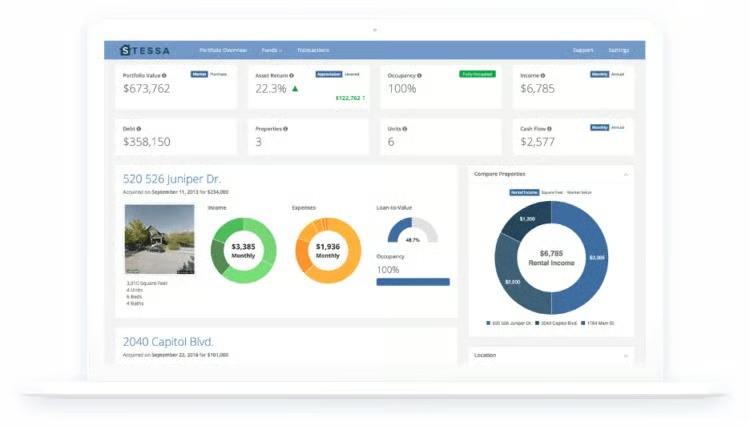
Stessa is built specifically for rental property investors, making it a strong choice for landlords who want simple income and expense tracking by property. It helps users track transactions, organize financial accounts, monitor property performance, collect rent online, track mileage, and create tax-ready reports,
This platform is best suited for investors who want a clean, rental-focused system for tracking property finances without the complexity of traditional accounting software. For rental owners who want property-level reporting, a simple dashboard, and investor-friendly tools, Stessa is a strong fit.
Stessa’s key features
- Property-level income and expense tracking
- Free plan available
- Bank and financial account connections
- Mileage tracking
- Online rent collection
- Tenant ledger
- Rent roll
- Portfolio dashboard
- Property performance tracking
- Tax-ready reports
- Accountant access
- Mobile receipt scanning
- Maintenance tracking on eligible paid plans
How to choose the best real estate accounting software for you
You shouldn’t choose accounting software just because it’s popular. The best real estate accounting software depends on how you make money, how many properties or transactions you manage, and how much accounting complexity you need.
Here are a few things to consider as you look for the right accounting software:
- Your business type: Real estate agents may need mileage tracking, receipt capture, invoicing, and tax reporting. Landlords and property managers may need rent collection, tenant portals, owner statements, maintenance tracking, and property-level reporting.
- Core accounting features: Look for tools like income and expense tracking, invoicing, bank reconciliation, profit and loss reports, balance sheets, general ledger, bill tracking, and accountant access.
- Property management features: If you manage rentals, consider whether you need tenant portals, online rent payments, maintenance requests, lease tracking, owner portals, or common area expense allocations.
- Pricing: Make sure the platform fits your budget now and as your business grows. Some tools charge by plan, while others vary by number of units, users, add-ons, or transaction fees.
- Ease of use: Accounting software only helps if you actually use it. Choose a platform with a clear dashboard, easy transaction entry, useful reports, and customer support when you need help.
- Integrations: Consider whether the software connects with your existing tools, such as bank accounts, payment processors, tax software, CRM systems, payroll, or property management platforms.
My methodology
At The Close, our methodology is based on providing real estate professionals with the most accurate, detailed, objective information to make smart business decisions. Our team of real estate professionals, researchers, and writers works together to do thorough research.
To help you find the best real estate accounting software for your business, I considered a variety of options based on these criteria:
- Pricing: I reviewed each platform’s starting price, plan options, free trials, free plans, add-on costs, user limitations, and overall value for real estate professionals.
- Accounting features: I looked for essential accounting tools, including income and expense tracking, invoicing, recurring invoices, bank connections, bank reconciliation, profit and loss reports, balance sheets, accounts receivable, accounts payable, general ledger tools, and accountant access.
- Real estate-specific features: I considered tools that are especially useful for real estate professionals, such as property-level reporting, rent collection, tenant portals, owner portals, maintenance management, mileage tracking, vendor management, common area expense allocations, and portfolio tracking.
- Customer support: I reviewed the availability of customer support, including phone, chat, email, self-help resources, onboarding, training, user communities, and access to outside bookkeepers or accounting professionals.
- Ease of use: I evaluated how easy each platform is to set up, navigate, and use day-to-day. I also considered dashboard readability, mobile access, cloud-based access, transaction entry, and whether the software feels approachable for users without an accounting background.
- User reviews: I considered customer feedback from third-party review sites to better understand how each platform performs in real-world use, including reliability, customer service, usability, reporting, and overall satisfaction.
Frequently asked questions (FAQs)
What is real estate accounting software?
Real estate accounting software helps agents, investors, landlords, and property managers track income, expenses, invoices, rent payments, bills, taxes, and financial reports. Some platforms focus on general accounting, while others include property management tools like tenant portals, maintenance requests, and owner statements.
Should real estate investors use accounting software?
Yes, real estate investors should use accounting software to track income, expenses, rent payments, repairs, mortgage interest, insurance, taxes, and property performance. Organized accounting can make it easier to evaluate cash flow, prepare taxes, and understand whether each property is profitable.
What is the difference between accounting software and property management software?
Accounting software focuses on financial tasks like income, expenses, invoices, bills, reports, and bank reconciliation. Property management software usually includes those tools plus rental-specific features like tenant portals, rent collection, maintenance requests, lease tracking, owner portals, and property-level reporting.
What accounting reports should real estate professionals track?
Real estate professionals should track profit and loss statements, balance sheets, cash flow reports, expense reports, accounts receivable, accounts payable, mileage records, tax summaries, and property-level reports when applicable. These reports can help with budgeting, taxes, and business planning.
Bottom line
The best real estate accounting software depends on your business model. DoorLoop and Buildium are strong fits for landlords and property managers who need property management and accounting in one platform. Stessa is a strong option for rental property investors who want simple property-level tracking. FreshBooks is best for agents who want an easy mobile accounting app, while QuickBooks is a flexible choice for real estate professionals who want robust accounting and broad integrations.
Before choosing a platform, consider what you need most: simple bookkeeping, property-level reporting, online rent collection, mileage tracking, tenant portals, maintenance management, or accountant access. The right software should make your finances easier to manage, not harder.
You may also like…