





































Collecting rent is only one part of managing a rental property. You also need to review applicants, prepare leases, keep documents organized, respond to repairs, and understand what the property is earning. Avail and TurboTenant bring those responsibilities into one platform, but their free tools, paid features, and pricing work differently.
As a real estate agent who has worked with landlords, I’ve found that convenience matters just as much as the feature list. Landlords want tools that make payments easier to track, paperwork easier to find, and tenant communication easier to manage. In this Avail vs. TurboTenant comparison, I’ll explain where each platform fits those needs and why Avail stands out for landlords who want useful management tools without immediately purchasing a subscription.
| Platform | Best for |
|---|---|
| Avail | DIY landlords who want free lease creation, rent collection, maintenance tracking, and property-level income and expense records |
| TurboTenant | Landlords who prioritize dedicated mobile apps or want paid tools for more detailed rental accounting |
Why you can trust The Close
As a licensed real estate agent who has worked with landlords, I understand why clear paperwork, reliable communication, and organized records matter throughout a tenancy. The landlords I’ve worked with prioritize practical tools that help them collect rent, evaluate applicants, manage repairs, and keep track of their property’s finances.
For this comparison, I reviewed both platforms’ published features, pricing, payment policies, and support resources. My recommendations connect those details to everyday landlords' needs, so you can understand what each platform offers and which differences would matter to your rental business.

Avail vs TurboTenant: A head-to-head comparison
| Feature | ||
|---|---|---|
| Free plan | Unlimited | Free |
| Starting price paid plans | Unlimited Plus $9 per unit per month | Essentials $12.42 per month |
| Rental advertising | Listing distribution, inquiry management, and showing tools | Listing distribution, inquiry management, and showing tools |
| Applications and screening | Online applications and optional screening reports | Online applications with screening |
| Custom application questions | Included in Unlimited Plus | Included in Pro |
| State-specific lease creation | Included on the free plan | Paid plan required to finalize and send a platform-generated lease |
| Online rent collection | Included | Included |
| Tenant ACH payment fee | $2.50 on Unlimited; waived on Unlimited Plus | $2 on Free and Essentials; waived on Pro |
| Tenant card payment fee | 3.5% | 3.49% |
| Maintenance tracking | Tenant requests, photos, communication, and repair-cost records | Tenant requests, communication, and repair tracking |
| Financial tools | Built-in rental income and expense tracker | Basic expense tracking; fuller accounting tools with Pro |
| Mobile access | Mobile-friendly website | Dedicated landlord and renter apps |
Avail vs TurboTenant: Overview, pros & cons, and when to use
Avail is designed for landlords who manage their own rentals and want to keep the rental process connected. Its free Unlimited plan includes tools for advertising, applications, lease signing, rent collection, maintenance tracking, and organizing income and expenses. That lets landlords keep managing the property after the lease is signed.
What stands out to me is the connection between everyday activity and recordkeeping. Payments and maintenance costs recorded through Avail feed into its accounting tracker, while landlords can add transactions handled elsewhere. For someone juggling tenant communication and property expenses, that can reduce the amount of information that needs to be entered twice.
| Pros | Cons |
|---|---|
|
|
When to use Avail
- You want to create and sign leases without a paid subscription.
- You need rent collection, maintenance, and basic financial tracking together.
- You manage your properties yourself.
- You prefer a monthly upgrade priced by unit.
- You want repair costs connected to your property records.
- You are c comfortable managing rentals through a mobile-friendly website.
Avail covers a broad range of rental tasks for free, while TurboTenant offers another free starting point for advertising, screening, rent collection, and maintenance. Its paid Essentials and Pro subscriptions add features like completed lease agreements, faster eligible payouts, and more advanced financial tools. Those subscriptions are billed annually, with prices based on the number of units managed.
TurboTenant is particularly worth comparing if mobile access or accounting depth is a priority. Its dedicated apps support work away from a computer, while Pro adds a fuller accounting offering. I would weigh those benefits against the tools you already use and whether you need another annual subscription.
| Pros | Cons |
|---|---|
|
|
When to use TurboTenant
- You want a dedicated app for managing rentals on your phone.
- You are comfortable paying annually for additional tools.
- You need more detailed accounting capabilities.
- You want to compare subscription costs across a larger portfolio.
- You need Pro-level features such as additional user roles or multiple connected payout accounts.
Avail vs TurboTenant: Who wins each category?
Pricing and value
🏆Winner: Avail
Avail gives landlords access to free lease tools alongside rent collection, maintenance tracking, and basic financial organization. Unlimited Plus costs $9 per unit per month and adds features such as eligible FastPay payments, waived ACH fees, custom application questions, and additional lease customization.
Turbotenant’s Free plan covers several core tasks, but paid subscriptions are needed for completed platform-generated leases and other features. Annual pricing can be cheaper than Avail’s paid plan across multiple units, depending on which tools you need.
I would choose the features first, then calculate the cost. A free plan that handles your work is better value than a paid subscription with tools you rarely open.
Rental listing exposure
🏆Winner: Tie
Avail distributes listings to rental websites, including Realtor.com and Redfin. It also provides tools to manage inquiries and schedule showings, helping landlords keep the response process organized.
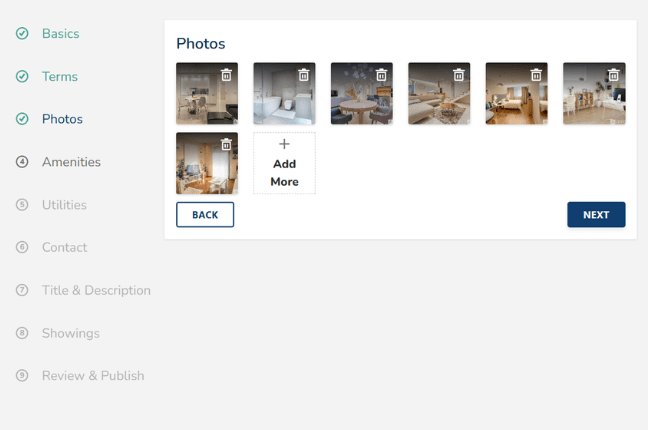
TurboTenant also distributes rental listings across multiple websites and includes lead management and showing tools. Both can reduce the work of creating separate listings and handling inquiries in different places.
From my perspective, the useful question is where qualified renters in your area are searching. I would also consider how easily you can respond, arrange a showing, and move an interested renter toward an application.
Applications and tenant screening
🏆Winner: Tie
Avail collects applicant information and lets landlords request credit, criminal background, and eviction reports. Its standard application is free, while screening reports carry separate charges. Published examples include $30 for an individual report and $55 for the full bundle, with pricing subject to location and applicable requirements.
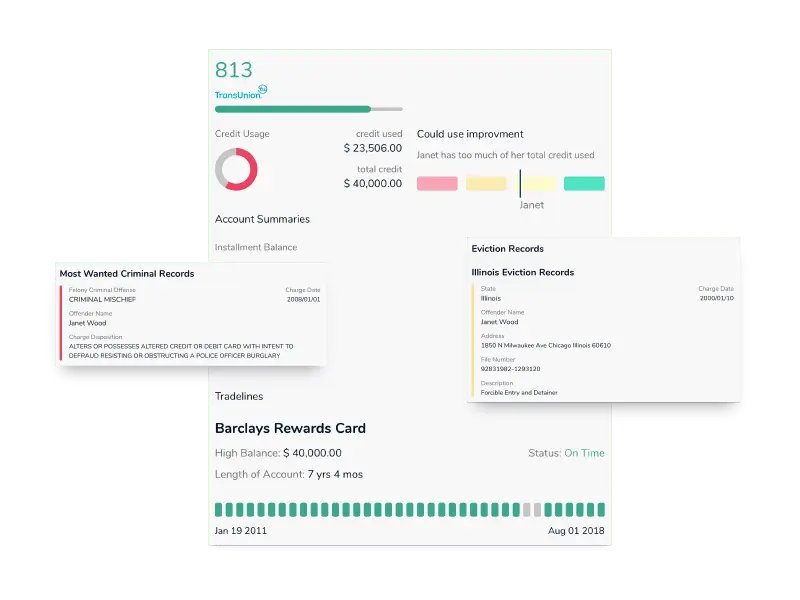
TurboTenant combines its standard application with screening. Applicants generally pay $55 when applying through a Free-plan landlord or $45 through an Essentials or Pro landlord. The landlord can choose to cover the fee. Pro also provides access to additional income-verification and document-fraud tools.
Lease creation, signatures, and document access
🏆Winner: Tie
Avail includes state-specific, lawyer-reviewed lease templates and electronic signing on its free plan. Unlimited Plus adds more customization and reusable lease templates. That makes it a strong option for landlords who want to prepare rental paperwork without first purchasing a subscription.
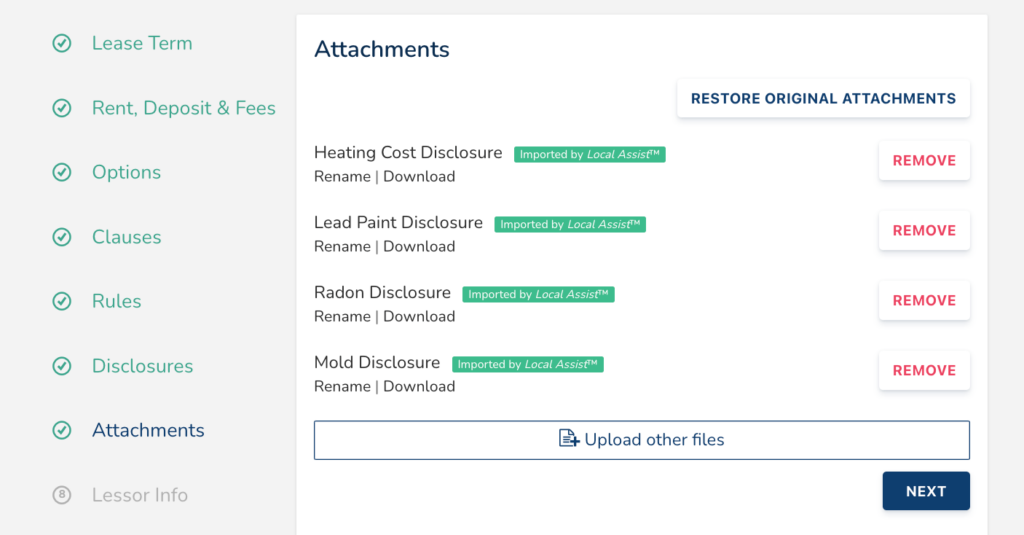
TurboTenant lets Free-plan users begin building and saving a lease, but an Essentials or Pro subscription is required to finalize it or send it for signatures. Essentials covers TurboTenant’s generated leases and addendums; Pro adds unlimited signatures for uploaded documents and signature templates.
For landlords, document access matters after move-in, too. I would check how easily you can retrieve the signed lease, find an attachment, and download a copy. Keep a separate backup of important rental paperwork.
Related articles
7 Best Rent Payment Services for Landlords & Tenants in 2026
Landlord Guide: How to Write a Late Rent Notice Template
How to Hire a Property Manager in 8 Steps
Free Rental Application Form Templates & What to Include
Online rent collection
🏆Winner: Avail
Avail supports scheduled payments, reminders, and payment tracking. Its guidance lists standard ACH deposits at approximately three business days after withdrawal, with eligible FastPay payments arriving approximately the next business day. FastPay requires Unlimited Plus and qualifying account and payment settings.
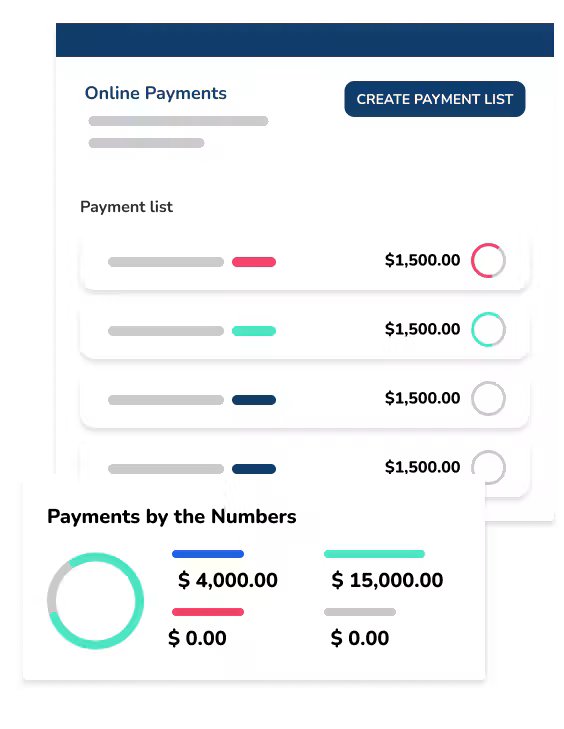
TurboTenant lists standard ACH deposits at approximately five to seven business days. Eligible expedited ACH payments on Essentials or Pro generally take two to four business days. These are estimated processing windows, rather than guaranteed deposit dates.
Avail and TurboTenant both charge tenant payment fees under certain plans and payment methods. I would explain these costs before move-in so tenants understand their options and the landlord knows when to expect funds.
| Payment method | Avail | TurboTenant |
| ACH on the free plan | $2.50 per payment | $2 per payment |
| Play with waived tenant ACH fees | Unlimited Plus | Pro |
| Credit/debit card | 3.5% | 3.49% |
Maintenance tracking
🏆Winner: Tie
Avail lets tenants submit requests with photos, communicate about the issue, and follow its status. Landlords can record repair costs and maintain a history of the work. That connection between the request and the expense is particularly useful for keeping property records organized.
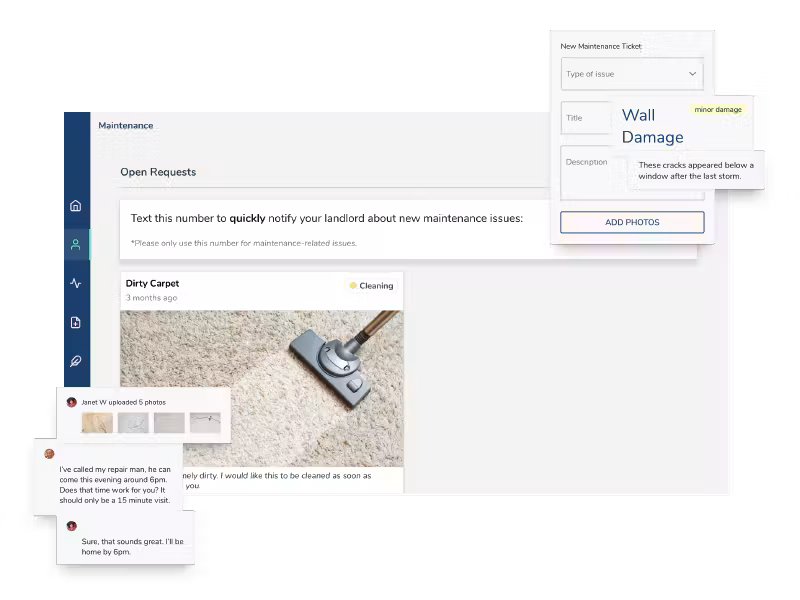
TurboTenant also includes free maintenance tracking. Landlords can receive tenant requests, create their own records, communicate with renters, and track repairs through completion.
I would focus on whether the process is easy enough that tenants will use it consistently. A clear description, useful photos, and one place for updates can make coordinating a repair easier than a scattered exchange of texts.
Advanced accounting and financial reporting
🏆Winner: TurboTenant
Avail’s free accounting tracker helps landlords organize rent payments, maintenance costs, and other transactions by property. Landlords can also enter expenses manually and export their records, making it useful for straightforward bookkeeping.
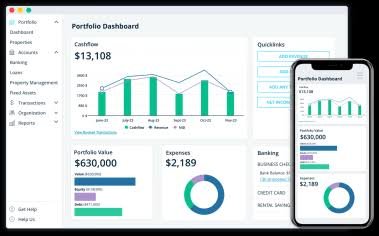
TurboTenant is best for landlords who need more detailed financial tools and are willing to purchase Pro. Its accounting features include financial reports, fixed-asset and depreciation tracking, and automatic loan tracking. I would consider that added depth valuable for landlords whose bookkeeping needs have grown beyond tracking income and expenses.
Mobile access
🏆Winner: TurboTenant
Avail lets landlords manage their rentals through a mobile-friendly website. You can access the platform from your phone without downloading an app.
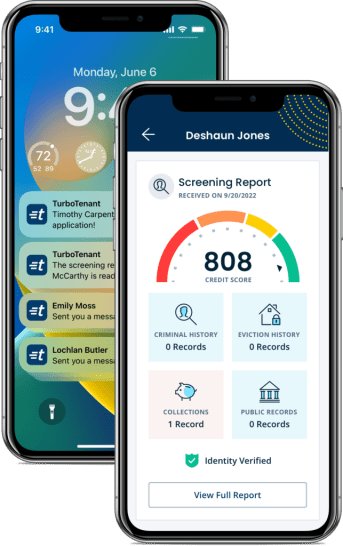
TurboTenant offers dedicated landlord and renter apps, giving it the advantage in this category. Landlords can receive payment notifications, communicate with renters, and document expenses from their phones. For owners who regularly handle rental tasks while away from a computer, that convenience makes TurboTenant worth considering.
Customer support
🏆Winner: Avail
Avail publishes phone and email contact options alongside its help center. Having someone to contact can be valuable when a landlord is setting up a lease or helping a tenant understand a payment issue.
TurboTenant offers chat and email support to all users, along with an AI support assistant. Phone support is available to landlords with an Essentials or Pro subscription.
For a first-time landlord, I would give support access real weight. A feature is only helpful if you can understand how to use it when something needs attention.
Overall winner: Avail
Avail is my recommendation for DIY landlords who want to handle the rental cycle without buying a subscription just to complete a lease. Its combination of free leasing tools, rent collection, maintenance tracking, and income and expense organization addresses the priorities I hear from landlords: fewer scattered records, clearer communication, and a manageable process.
Avail and TurboTenant both deserve consideration, particularly when comparing paid features. TurboTenant’s dedicated apps and Pro accounting tools may be more useful for certain owners. Still, for a landlord who wants the core tasks connected and the option to upgrade later, Avail offers a strong starting point.
Methodology
I compared Avail and TurboTenant using their published pricing, product information, and support documentation. As a real estate agent who has worked with landlords, I focused on the tools they prioritize: collecting rent, screening applicants, preparing leases, managing maintenance, and keeping financial records organized.
I considered both free and paid plans, recognizing that a platform can offer better free tools while another provides more advanced features through a subscription. My comparison covered:
- Pricing and value
- Subscription costs, included features, tenant fees, and how pricing changes as a portfolio grows.
- Rental listing exposure
- Listing distribution and tools for managing inquiries and scheduling showings.
- Applications and tenant screening
- Screening reports, applicant charges, customization, and additional verification options.
- Leasing and document access
- Lease templates, electronic signatures, customization, and access to stored paperwork.
- Online rent collection
- Payment methods, processing fees, estimated deposit times, and recurring-payment tools.
- Maintenance tracking
- Tenant requests, photos, communication, repair updates, and expense records.
- Financial reporting and accounting
- Basic income and expense tracking alongside more advanced accounting tools, with attention to which plans include them.
- Mobile access
- Mobile-friendly websites and dedicated apps, including the tasks landlords and tenants can complete from their phones.
- Customer support
- Available support channels, plan restrictions, and resources for learning the software.
Frequently asked questions (FAQs)
Can I start using rental software with tenants already in place?
Yes. You can generally add an occupied property and set up ongoing management tools without finding a new tenant. Review the process for adding the existing lease, payment schedule, and tenant information before inviting renters to join.
Does a free landlord account mean tenants pay nothing?
No. A free landlord subscription may still involve tenant screening charges or payment-processing fees. Compare those costs alongside the landlord subscription so everyone understands what they will pay.
How can I make the transition easier for tenants?
Give tenants clear instructions, explain any payment fees, and let them know when the new process begins. Walk through how to pay rent, locate documents, and submit a maintenance request so they know where to go for each task.
Your take
The rental software you choose should help with the work that keeps coming back every month. In my experience working with landlords, rent collection, clear lease paperwork, organized repairs, and accessible financial records matter more than having a long list of features. Start with the task that takes too much time or keeps getting missed.
Avail gives landlords a useful way to connect those responsibilities without immediately paying for an upgrade. Before choosing, add a property and explore the process from the tenant’s side as well as your own. A system that works comfortably for both of you is more likely to become part of your routine.
You may also like…
Avail Review 2026: Pricing, Features, Pros & Cons
Avail vs Zillow Rental Manager: Best for Landlords?
TurboTenant Review: Is It Right for Your Business?
5 Best Free Property Management Software for Landlords in 2026